How to Download Instagram Photos and Videos in the Highest Quality in 2025?
Instagram is the place where we share the most vibrant moments of our lives, whether it’s a breathtaking landscape, a creative masterpiece, or just something that caught our eye
But here’s the thing: when you try to download these photos or videos, the quality often takes a hit because of Instagram’s compression. So, how to download Instagram photos and videos in the highest quality?”
In this guide, we’ll explore the best tools and techniques to help you get high-resolution Instagram downloads, so you can keep your favorite shots as crisp and clear as when you first saw them. Let’s dive in!
How to Download High Quality from Instagram without Reducing Resolution? (5 Online Tools & Apps)
Have you ever noticed that your Instagram photos or videos look pixelated or blurry when you try to download them? This happens because Instagram compresses media to save space, which can affect quality. While Instagram doesn’t offer a direct option to download content unless you’re the creator, you can save posts within the app, though they aren’t available as downloadable files.
To download media without losing quality, you’ll need to use third-party tools; just be sure to get permission from the original creator to respect their rights. If you’re looking to save your favorite Instagram photos or videos, here are some safe and legal methods to do so:
App/Tool | Platform | Features | Pros | Cons | ||
Online | Download photos, videos, stories, and IGTV | High-quality downloads, no installation |
| |||
Snapinst.app | Online | Download photos, videos, stories | Easy, free, multiple media types | Only for public accounts, occasional ads | ||
InstaDownloader | Online | Download photos, videos, IGTV, stories | Free, easy, no registration required | Ads, no bulk download | ||
FastSave | Android | Download photos, videos, and bulk download | Bulk downloads, offline access | Android only, ads | ||
Reposta | iOS & Android | Download and repost content | Easy to use, no watermarks | Ads may share device data |
In this section, we’ll dive deeper into the top tools and apps that can help you save Instagram photos and videos in the highest definition possible.
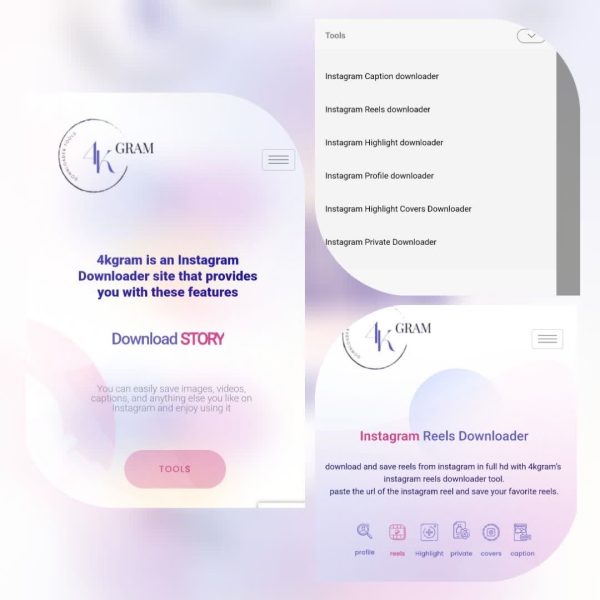
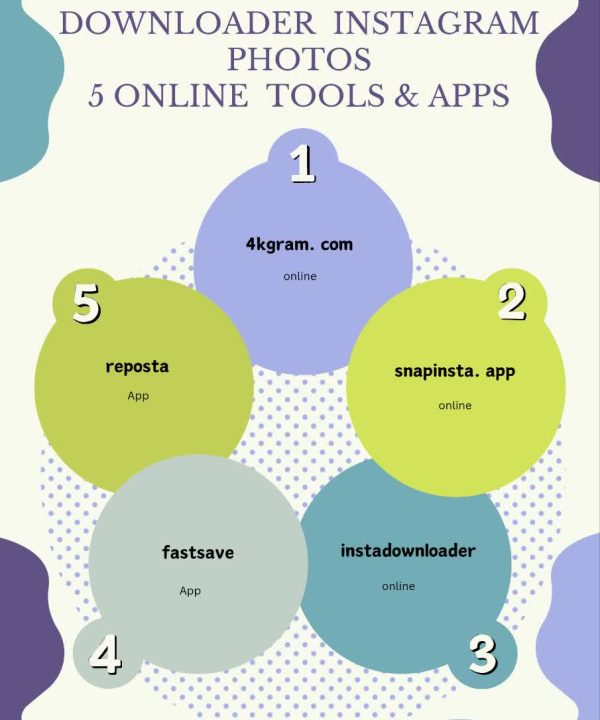
In the first option lets have the detail look to 4kgram, Instagram photos and videos downloader in the highest quality. It allows you to get photos, videos, stories, and even IGTV videos in their original resolution, preserving clarity and detail.
One of its key advantages in saving IG videos is that it requires no installation; simply visit the website and start downloading. It’s free to use, making it an accessible option for everyone. The tool is compatible with all devices, whether you’re using a mobile phone, tablet, or desktop, and its user-friendly interface ensures you can easily navigate without any technical expertise.
• Snapinst.app (Online)
The other practical that is a free online tool called Snapinst and allows Instagram media download, including photos, videos, and stories, and preserves original resolution, all without requiring installation. The tool is user-friendly, works across devices, and is accessible to everyone.
However, it only works with public accounts, may show occasional ads, and occasionally experiences slower download speeds or video quality issues. Despite these minor drawbacks, this app is a great Instagram content downloader option for quick, easy, high-quality saves.
• InstaDownloader (Online)
When it comes to grab Instagram photos and videos in high definition, InstaDownloader is a web-based tool that allows users to get photos, videos, IGTV, and stories. It’s free, doesn’t require installation, and is easy to use across devices with no registration needed. While it’s quick and user-friendly, the site may display occasional ads, and the quality of downloads may vary.
It doesn’t offer bulk downloading, and it’s limited to Instagram content only. Nonetheless, it’s a great option for personal, one-off saves if you want a simple and fast solution to download Instagram photos and videos in the highest quality.
• FastSave (App)
Now here is the good news for Android users! FastSave is an Android app that allows users to get Instagram high-resolution Images and videos, including bulk saves, for offline access. It’s known for being fast and efficient, enabling users to quickly save multiple media files at once.
The app prioritizes user privacy by ensuring that no data is collected or shared with third parties. Data is encrypted during transit, ensuring secure transfers. However, the app is only available on Android devices and features ads, which might be a downside for some users.
• Reposta (App)
And in final introduction it is turn to Reposta (Repost for Instagram) that let you to repost Reels or download images and video clips from Instagram without needing to log in or deal with watermarks. It supports posts with multiple images and videos and provides a simple, fast way to save media directly to your gallery.
The app ensures data encryption during transfers and does not collect user data, although it may share device or other IDs with third parties. While it is free to use, it does feature ads, which some users may find distracting.
How to Use the Online Tools and Apps to Get Instagram High-Definition Downloads?
Here’s a simple guide on how to use these tools and apps to grab your desired Instagram media. By following these steps, you can easily download Instagram photos and videos in the highest quality.
- Choose the Tool/App: Select from the online tool or app you’d like to use.
- Access the Content: Open the Instagram app or website and find the photo, video, story, or reel you wish to download.
- Copy the URL or Username: On desktop, click the three dots on the post and select “Copy Link.” On mobile, tap share icon, then choose “Copy Link” or get the username.
- Open the Tool or App: For online tools, open the website in your browser; for apps, launch the app on your device.
- Paste the URL: In the input box on the tool or app, paste the URL or username of the Instagram post you copied earlier.
- Select Your Download Option: Choose the quality of the download if prompted (usually the highest resolution available).
- Download the Content: Click “Download” to save the photo, video, or reel to your device in its original resolution.
What Are the Instagram Download Extensions to Get High-Quality Photos & Videos?
These extensions integrate directly into your browser, allowing you to download Instagram photos, videos, and stories quickly and efficiently, without the need to leave the Instagram website.
They are particularly useful for users who frequently save Instagram media and want a seamless, one-click, and HD solution. Let’s have a preview of them:
App | Browsers | Features | Pros | Cons |
Video Downloader for Instagram | Chrome, Firefox | Download photos, videos, and stories from Instagram. | Simple to use, fast downloads, supports multiple formats (FLV, MP4, MOV, WebM), and batch downloads. | Limited to Instagram content, occasional quality loss, no YouTube support |
SaveFrom.net | Chrome, Firefox, Opera | Download media (photos, videos, audio) from over 40 websites, including Instagram, Facebook, VK.com, and TikTok. | One-click download, batch downloads, quality selection, supports MP3 with proper titles & bitrate. | Limited browser compatibility, ads on the site, mixed user reviews |
• Video Downloader for Instagram
The Video Downloader for Instagram™ Chrome extension is an easy and fast tool that allows users to download Instagram videos, photos, and stories directly to their computer. With this extension, you can save various video formats such as FLV, MP4, MOV, and WebM. It supports multiple simultaneous downloads, making it a convenient choice for those who want to download content in bulk.
The tool to download Instagram photos and videos in the highest quality does not require users to watch videos online, giving them the freedom to download all content to their devices. While the extension provides a user-friendly interface, it comes with a few limitations, such as a ban on downloading YouTube videos due to Google Chrome store restrictions.
• SaveFrom.net
The SaveFrom helper Chrome extension is a versatile tool for downloading media from over 40 websites, including popular social networks like Facebook, Instagram, VK.com, and TikTok. With just one click, users can download photos, videos, and audio files, including MP3s with proper titles and bitrate information.
The extension supports batch downloading, making it easier to save multiple files at once, and allows users to select the quality of the files they want to download. Additionally, SaveFrom.net integrates directly into website designs, adding download links for albums and media files.
How to Use Extensions for Top-Resolution Instagram Downloads?
Here’s how you can ensure that you’re downloading Instagram content in its highest resolution using Extensions.
By selecting the HD option, you can ensure that you’re getting the sharpest image and highest-quality video possible, without any compression or loss of detail.
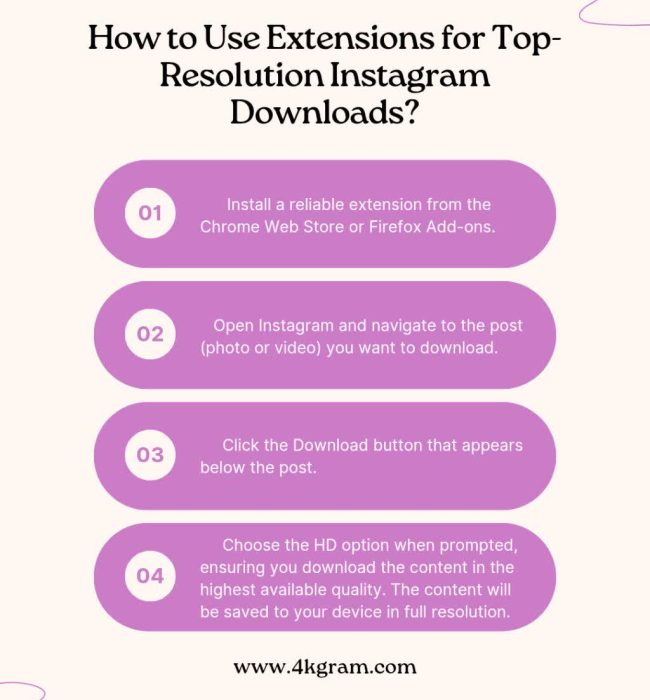
- Install a reliable extension from the Chrome Web Store or Firefox Add-ons.
- Open Instagram and navigate to the post (photo or video) you want to download.
- Click the Download button that appears below the post.
- Choose the HD option when prompted, ensuring you download the content in the highest available quality. The content will be saved to your device in full resolution.
Conclusion
In conclusion, the methods above are the ultimate solution if you’re struggling with how to download Instagram photos and videos in the highest quality. With its simple, fast, and reliable services, you can ensure that the images and videos you get are as crisp and clear as the originals.
Have you tried the tools and apps or another Instagram downloader? Which tool works best for you when it comes to saving high-quality content? Share your thoughts in the comments below!
For your convenience:
If you want to download Reels in the highest quality, use the Instagram Reels downloader tool.
To download saved stories, use the Instagram Highlights downloader.
To download highlight covers, use the Instagram Highlight Cover downloader.
To download profile pictures, the Instagram Profile downloader can help you.
And finally, if the content of a private page catches your attention, the Instagram Private downloader tool can assist you.
Can I download Instagram photos without using apps?
Yes, you can use online tools or browser extensions that work directly without installing an app.
Is it legal to download Instagram videos and photos?
It’s legal if you download your own content. For other creators’ content, always get permission to respect copyright.
How do I save Instagram photos and videos in original quality?
Use trusted tools that preserve resolution, such as 4kgram.com or Snapinst, and always choose the HD option.
Can I bulk download Instagram content in high resolution?
Yes, some apps like FastSave allow bulk downloads, but this feature isn’t available in all tools.
Do Instagram downloaders work on both iOS and Android?
Yes, many apps and online tools are cross-platform, but some, like FastSave, are Android-only.
Recent Posts


![How to Add Music to an Instagram Story with Multiple Photos? [A Step-by-Step Process]](https://4kgram.com/wp-content/uploads/2025/07/Add-music-to-Instagram-story-with-multiple-photos.jpg)